Configure Bot Protection on a Proxy
This article explains how to configure Bot Protection for a HTTP proxy in the Threat Protection platform, while also providing an overview of how Bot Protection works, mitigation techniques and important deployment considerations.
Bot Protection helps safeguard your applications from malicious automated traffic, while allowing legitimate users and beneficial bots to access your service.
Configuring Bot Protection involves:
- Understanding how Bot Protection works
- Selecting an appropriate protection mode
- Applying the configuration to your proxy
What Is Bot Protection?
Bots are a normal part of internet traffic, and not all bots are harmful. Many perform useful functions such as search engine indexing, uptime monitoring, and integrations. However, malicious bots and automated tools are commonly used for activities such as:
- DDoS attacks
- Credential stuffing
- Large-scale data scraping
- Fraudulent transactions
- Theft of sensitive or proprietary information
Uncontrolled bot traffic can degrade application performance and introduce significant security risks. Bot Protection helps mitigate these threats while ensuring legitimate traffic is allowed through.
How Bot Protection Works
Bot Protection operates as a Layer 7 (application‑layer) protection module. It continuously monitors incoming HTTP traffic and analyses both traffic volume and behavioural characteristics.
Behavioural Detection
The system compares real‑time traffic against a learned baseline profile for the protected service. When traffic deviates significantly from expected patterns, it may be classified as anomalous.
Detection signals may include (but are not limited to):
- Sudden surges in traffic volume
- Behaviour inconsistent with typical client patterns
- Indicators associated with automated tooling
Challenge‑Based Mitigation
When anomalous behaviour is detected (particularly when operating in Automatic AUTO mode), Bot Protection activates bot challenges on incoming requests to verify whether the client is a legitimate browser or an automated tool.
Challenge Types
When Bot Protection is triggered, one of the following challenge types may be issued.
HTTP Redirect Challenge
The HTTP redirect challenge performs a standard HTTP redirect and evaluates whether the client correctly follows it.
How it works
- The client receives a redirect response
- Legitimate browsers automatically follow the redirect
- Non‑compliant clients fail the challenge and are blocked
Pros
- Lightweight and fast
- Minimal impact on real browsers
- Effective against basic bots and scanners
Cons
- Some legitimate non‑browser clients may not follow redirects
- Can impact APIs or integrations that do not expect redirects
JavaScript Challenge
The JavaScript challenge requires the client to execute JavaScript and complete a small computational task within the browser.
How it works
- The client is served a JavaScript challenge
- The script must be executed to generate a valid response
- Only clients capable of running JavaScript successfully pass
Pros
- Highly effective against advanced bots
- Difficult to bypass using simple HTTP tooling
- Strong signal of a real browser
Cons
- Requires JavaScript support
- Will block non‑browser clients and APIs
- Introduces slight additional latency for end users
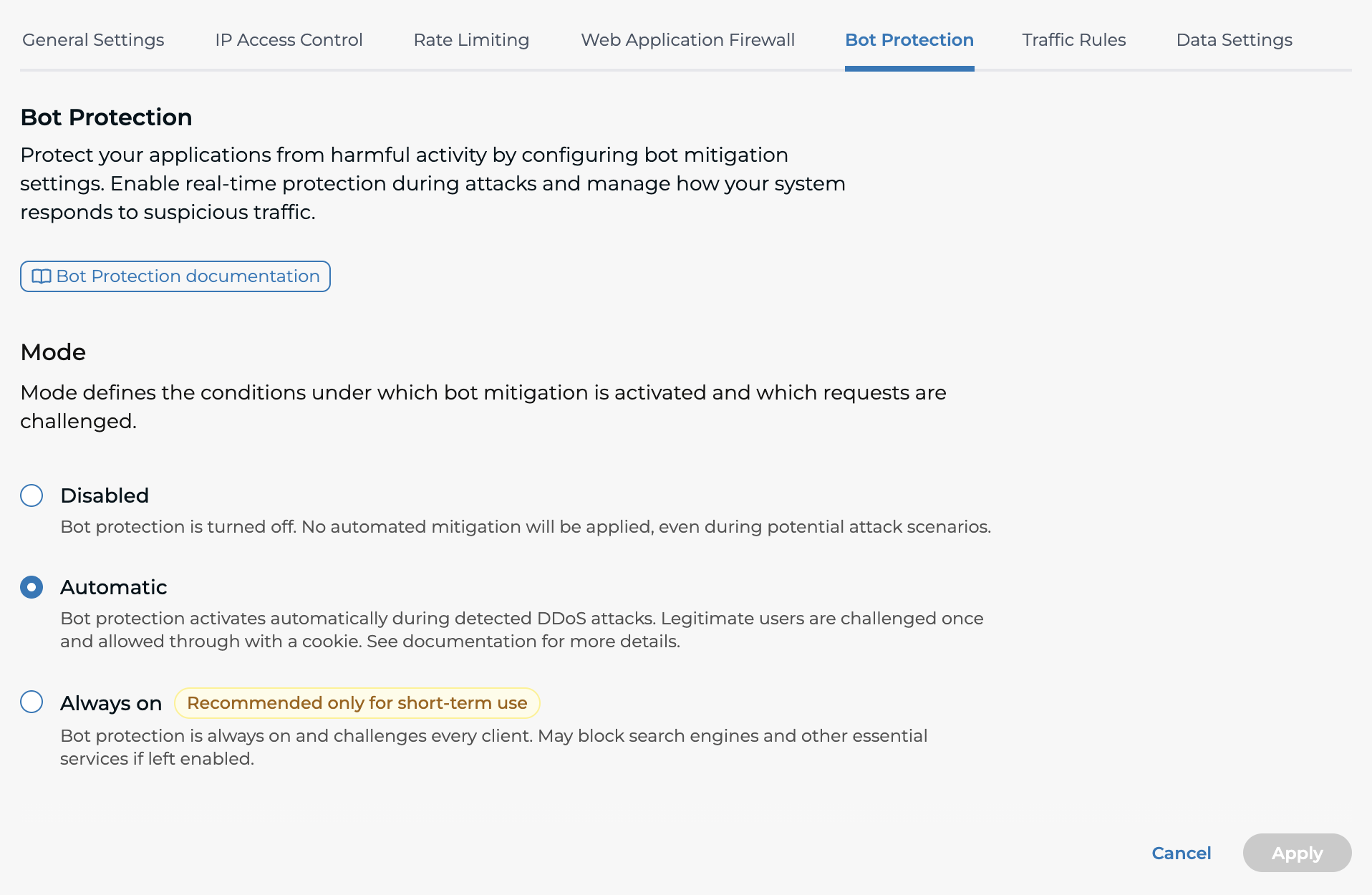
Bot Protection Modes
The Mode setting determines when mitigation is applied and how traffic is challenged.
Disabled
- Bot Protection is turned off
- No automated bot mitigation is applied, even during attack conditions
Automatic (AUTO)
- Bot Protection activates automatically during detected DDoS attacks or anomalous traffic patterns
- Mitigations are triggered only when behaviour deviates significantly from learned baselines
- Legitimate users are challenged once and then allowed through using a validation cookie
- Designed to reduce false positives by avoiding challenges on all traffic
- Default mode for all new HTTP proxies
This mode is recommended for most environments.
Always On
- Bot Protection is continuously active
- Every incoming request is challenged
⚠️ Warning Always On mode is not recommended for most use cases and should generally be used only for short periods, such as during an active attack. It significantly increases the risk of blocking legitimate traffic, including search engines and monitoring tools.
How to Configure Bot Protection
To configure Bot Protection for an HTTP proxy:
- Open the HTTP proxy configuration.
- Select Bot Protection.
- Select a mode:
- Disabled
- Automatic
- Always On
- Click Apply to save your changes.
Disable Bot Protection for Specific Hosts and Paths
To bypass bot protection for specific hosts or paths, create a traffic rule using the Disable Bot Protection action. Requests that do not match the rule continue to use the proxy’s configured bot protection settings.
See Disabling Bot Protection for configuration details.
Best Practices
- Use Automatic mode for most environments
- Avoid leaving Always On enabled for extended periods
- Monitor traffic patterns regularly to understand baseline behaviour
- Review Bot Protection settings after major application or traffic changes
- Closely observe traffic and client behaviour after enabling or modifying protection settings
Summary
Bot Protection provides an effective defence against automated abuse by combining adaptive detection, behavioural analysis, and browser‑based challenges.
When enabling Bot Protection, it is important to:
- Choose the appropriate protection mode
- Understand the impact on APIs, integrations, and SEO
- Monitor behaviour closely after deployment