Alert webhooks
A webhook posts every alert to a URL of your choice when it fires and again when it clears. Point it at a Slack channel, a paging or ticketing tool, or a service of your own.
Adding a webhook
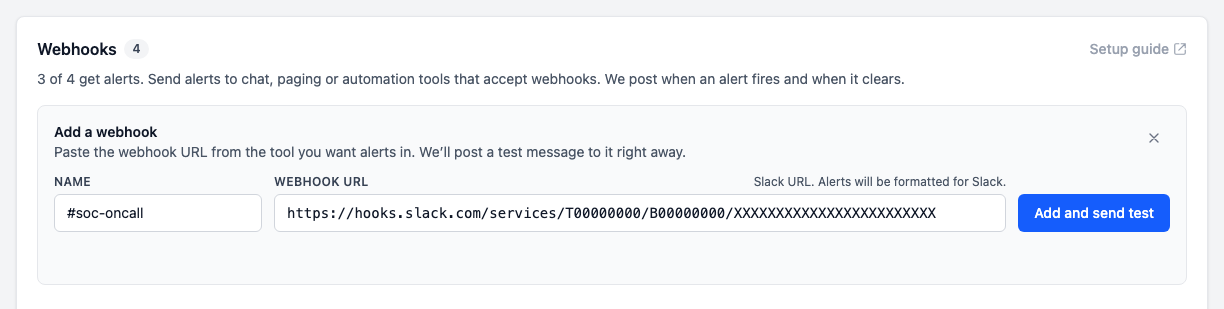
In the portal, open Settings, select the Alerts tab, and select Add webhook under Webhooks.
Give the webhook a name, paste the URL from the tool you want alerts in, and select Add and send test. A test message is posted to the URL straight away, and the portal shows whether it was delivered. In the event of a failed delivery, the webhook is still added and the panel shows how the URL answered, so a mistyped or expired URL is caught before a real alert depends on it. Fix the URL with Edit.
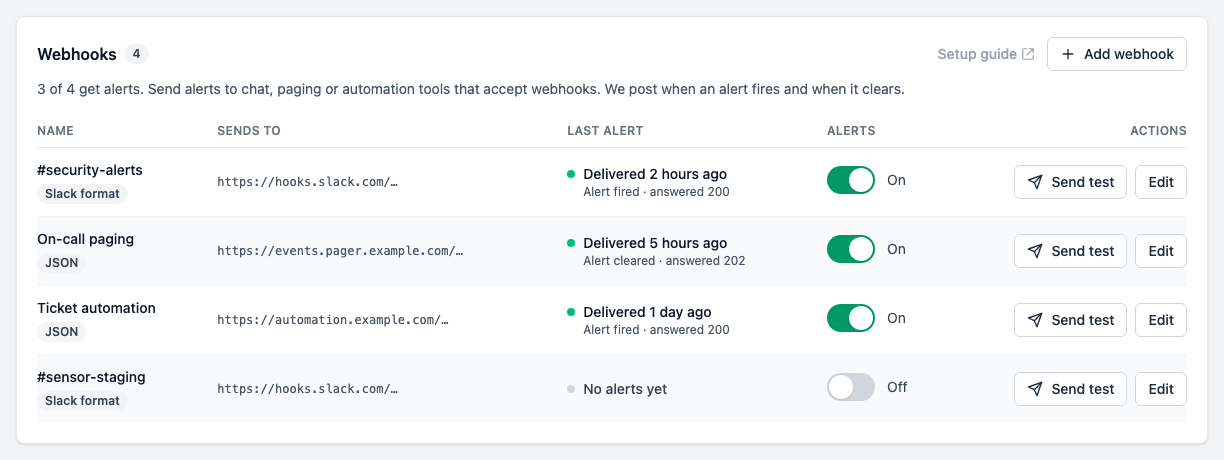
To check a webhook again later, select Send test next to it.
The signing secret is shown once, when the webhook is added. Copy it if you want to verify the messages you receive. Most tools, including Slack, do not need it.
Adding, changing, or testing a webhook requires edit access to the tenant. Other members can see the list but not change it. A tenant can have up to 10 webhooks.
The URL must use HTTPS and point to a public address. Messages are not sent to private or internal addresses, and redirects are not followed.
A webhook URL often works like a password, since anyone with access can post to it. Once saved, the portal only ever shows its scheme and host. To change it, select Edit and paste the new URL in full.
Sending alerts to Slack
Slack calls these incoming webhooks. To create one:
- Go to api.slack.com/apps, select Create New App, and create it From scratch in your workspace.
- Open Incoming Webhooks and turn on Activate Incoming Webhooks.
- Select Add New Webhook, pick the channel alerts should go to, and select Allow.
- Copy the webhook URL. It starts with
https://hooks.slack.com/services/.
Paste the URL into Add webhook in the portal. Slack URLs are recognized, and alerts are formatted for Slack, with the severity, code, and a link to the machine in the portal.
Other tools
Any other URL is sent the alert as JSON, described below. To change a webhook's format later, select Edit and pick Slack or JSON under Message format.
What is sent
Each message is an HTTPS POST with these headers:
| Header | Value |
|---|---|
Content-Type | application/json |
User-Agent | sensor-alerts/1 |
X-Sensor-Event | alert.fired, alert.resolved, or alert.test |
X-Sensor-Delivery | An ID for this message, the same on every retry |
X-Sensor-Signature | The signature, see Verifying the signature |
A JSON message looks like this:
{
  "version": 1,
  "deliveryId": "6a0f3c1e-2b7d-4c55-9e0a-3f1d8b2c7a90",
  "event": "alert.fired",
  "alertId": "c3e9a7d4-51f2-4b8e-a6d0-7e2f9c1b3a58",
  "status": "firing",
  "code": "events.discarded",
  "title": "Events discarded",
  "severity": "critical",
  "message": "42 events discarded in the last hour",
  "hint": "the machine ran out of memory in the last hour",
  "subject": "cowrie",
  "tenant": { "id": "9b1e4f2a-7c3d-4e8b-a5f6-0d2c8e7b1a34", "name": "Example Corp" },
  "machine": { "id": "f47ac10b-58cc-4372-a567-0e02b2c3d479", "name": "edge-sto-01" },
  "firstSeenAt": "2026-11-06T09:12:00Z",
  "firedAt": "2026-11-06T09:13:00Z",
  "url": "https://sensor.baffinbay.com/machines/f47ac10b-58cc-4372-a567-0e02b2c3d479",
  "text": "Example Corp · [CRITICAL] Events discarded on edge-sto-01/cowrie: 42 events discarded in the last hour"
}
| Field | Description |
|---|---|
version | Format version, currently 1. New fields may be added without changing it. |
deliveryId | Same as the X-Sensor-Delivery header. |
event | alert.fired or alert.resolved. |
alertId | The alert. Its fired and resolved messages share it. |
status | firing or resolved. |
code | What is wrong, see What is alerted. |
title | A short name for the code. |
severity | critical, warning, offline, or unknown. |
message | What was measured. |
hint | The likely cause, when one is known. |
subject | The container or disk the alert is about, when there is one. |
tenant, machine | The ID and name of each. |
s3Config | The ID and name of the S3 destination, on s3.* alerts only. |
firstSeenAt, firedAt, resolvedAt | When the problem was first seen, when the alert fired, and when it cleared. |
url | The machine in the portal, or the External logging tab for s3.* alerts. |
text | A one-line summary, for tools that only show text. |
Test messages have event set to alert.test and status set to test, and do not describe an alert or a machine.
Verifying the signature
Every message is signed with the webhook's signing secret, so your endpoint can check that it came from Sensor and was not changed. The X-Sensor-Signature header looks like this:
t=1793952720,v1=5257a869e7ecebeda32affa62cdca3fa51cad7e77a0e56ff536d0ce8e108d8bd
t is the Unix time the message was sent, and v1 is the hex HMAC-SHA256 of t, a period (.), and the raw request body, keyed with the whole secret including its whsec_ prefix.
To verify a message, compute the same value and compare it in constant time. Reject messages whose t is more than a few minutes old, so a captured message cannot be replayed later. For example, in Python:
import hashlib
import hmac
import time

def verify(secret: str, header: str, body: bytes, tolerance: int = 300) -> bool:
    parts = dict(item.split("=", 1) for item in header.split(",") if "=" in item)
    timestamp, signature = parts.get("t", ""), parts.get("v1", "")
    if not timestamp.isdigit() or abs(time.time() - int(timestamp)) > tolerance:
        return False
    signed = timestamp.encode() + b"." + body
    expected = hmac.new(secret.encode(), signed, hashlib.sha256).hexdigest()
    return hmac.compare_digest(expected, signature)
Use the body exactly as received. Parsing the JSON and serializing it again changes the bytes and breaks the signature.
Replacing the secret
If the secret may have leaked, select Edit on the webhook and then Replace secret. The old secret stops working straight away, so update your endpoint right after. The new one is shown once.
Delivery and retries
Answer with any 2xx status within 10 seconds to accept a message.
If the endpoint cannot be reached, times out, or answers 408, 429, or 5xx, the message is tried again, waiting 1 minute, then 2, 4, and so on up to an hour between attempts. It is tried up to 8 times, over about two hours. Other 4xx answers and redirects are not retried, since they will not change.
A message can arrive more than once, for example when your endpoint accepted it but the answer was lost. Use X-Sensor-Delivery to ignore repeats.
The Last alert column in the portal shows how each webhook's latest message went. When a webhook that is on has failed, the portal says so above the list.
Turning a webhook off or removing it drops the messages still waiting to be sent to it.
Next steps
- Alerts — what is alerted, and when alerts fire and clear.